English
 français
 Español
 русский
 português
 العربية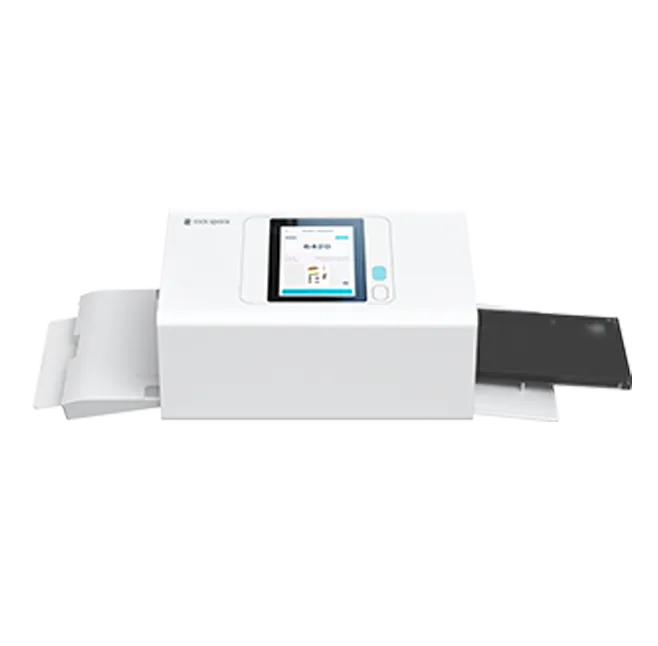




01
03

Jul 02-2026
Most sticker printer guides focus on specs — resolution, speed, and price. But the first question is more important: what type of machine does your business actually need?
Choose the wrong category, and even the best machine may fail. Choose the right one, and everything from supplier selection to ROI planning becomes easier.
This guide helps you understand the key machine categories and build your sticker printing business on the right foundation.
The first and most expensive mistake buyers make is choosing a consumer grade device for retail use. Home machines are designed for personal desks and occasional printing. Commercial machines are built for retail counters, continuous operation, and staff with no design training.
A home machine — for example, the Liene PixCut S1 — sits on someone's desk and prints one sticker at a time, operated by a person with design experience. A commercial machine sits behind a retail counter and handles 50 to 100 stickers per hour, operated by staff with zero design training.
Here are four key differences that separate a home-grade machine from a retail-ready commercial system:
Comparisons | Home-Grade (e.g. Liene PixCut S1) | Commercial-Grade |
| Operation Interface | Requires a phone app — staff must download, learn, and operate via personal device | Built-in touchscreen — no app download needed, one-tap operation for retail staff |
| Templates & Workflow | No pre-made photo sticker templates — users design and arrange layouts manually, time-consuming | Ready-to-use photo sticker templates — upload a photo and generate a print-ready sticker instantly, high store throughput |
| Consumables Management | No commercial tracking — manual inventory, no channel binding | Built-in consumables module — tracks usage, binds distribution channels, and drives repeat purchases |
| Backend & Data | No backend system — zero operational data or analytics | Management system with data analytics — enables scientific, data-driven store operations |
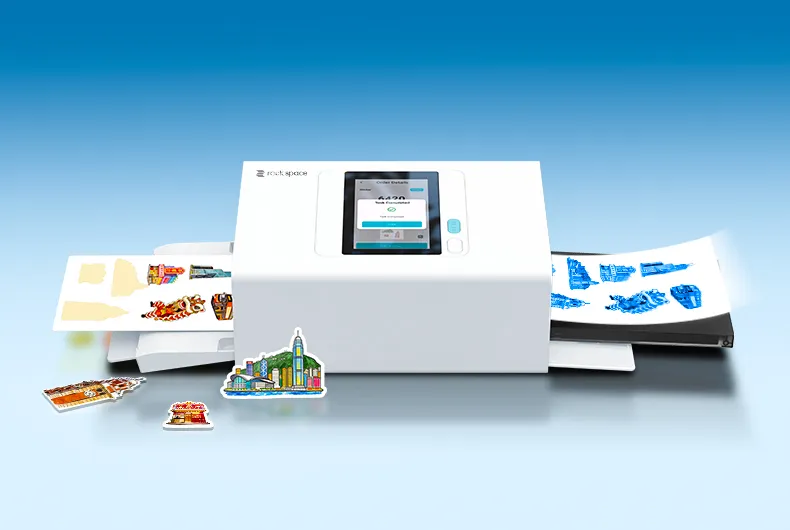
A commercial system replaces app dependency with a built-in touchscreen, manual design work with instant templates, and blind inventory with data-driven consumables management — turning any counter staff into a sticker production operator. If your goal is to turn walk-in customers into paying sticker orders, commercial-grade is not an upgrade. It is the baseline.
|
(AI Photo Sticker Printer) |
|
| Space & Investment | Counter corner, <1 m², low investment, lightweight operation | Dedicated booth, 3-5 m², high investment, high maintenance cost |
| Business Model | Embedded in existing retail store, leverages existing foot traffic, flexible across scenarios | Standalone operation, relies on natural/self-generated traffic |
| Output & Workflow | Auto contour cutting, sticker output, instant print-and-cut in one machine | Standard photo output, manual cropping needed, poor experience |
| Photo Input | Customer uploads photo on-site, supports pre-editing | On-site shooting only, carries risk of unsatisfactory results |
| Pricing & Repurchase | Low price per sticker, low consumer repurchase barrier, encourages frequent purchases | High price per photo, difficult to drive long-term repeat purchases |
| Ideal For | Phone shops, gift stores, photo studios, campus stores, pop-up counters | Malls, amusement parks, tourist attractions with high natural foot traffic |
The risk profile is what separates these two models. A traditional photo booth is an attraction in itself — it needs its own space, its own marketing budget, and its own customer acquisition funnel. It competes with every other entertainment option in the mall. You pay high rent for a dedicated spot before you know if the location will generate enough traffic.
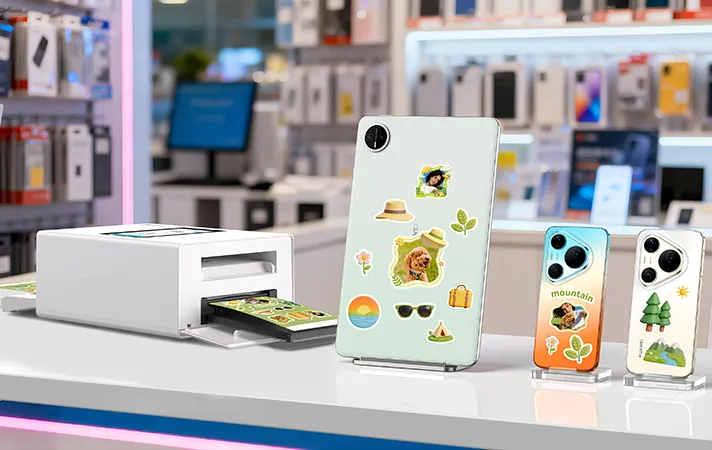
A desktop commercial sticker machine is the opposite. It is an add-on to an existing business. It does not need its own foot traffic. It converts the customers who are already walking into your phone shop, gift store, or photo studio. It requires no additional rent, no dedicated staff, and no separate marketing campaign. You start generating revenue from day one using the customer base you already have. Within the embedded desktop category, there are two form factors: compact countertop units and larger floor-standing stations. The key distinction is that both are embedded in your existing store, unlike a standalone booth. For exact counter dimensions and layout ideas, see our countertop space planning guide.
The commercial photo sticker printer and cutter is not just entering a growing market — it is emerging alongside a new photo sticker culture driven by personalization trends. Photos are no longer only used for storage or social media sharing. They are increasingly transformed into physical, customizable objects: stickers, phone decorations, and lifestyle accessories. Unlike traditional printing services, photo stickers combine emotion, customization, and instant physical output — making them highly attractive in retail environments where customers want something now, not tomorrow.
Three developments in 2026 have lowered the barrier to entry:
AI-powered templates eliminate design bottlenecks. Staff can generate professional-looking stickers with one tap — no graphic design skills needed.
Wireless printing removes the cable clutter that used to make counter setup complicated.
Touch-screen interfaces replace phone-reliant workflows, allowing multiple staff members to operate the machine without handing over personal devices.
This creates a new opportunity for stores to offer on-demand personalization directly at the counter — no inventory, no design complexity, and a service customers are increasingly willing to pay for. If you have a retail counter with foot traffic, 2026 is the year to add photo stickers to your revenue mix.
Once you've locked in your category — commercial-grade, embedded desktop model, photo sticker application — here's your decision path:
See what a commercial machine looks like → Browse our commercial sticker printer series
Compare technical specs across models → Sticker printer buying guide
Evaluate supplier reliability → Manufacturer evaluation checklist
Choosing the right sticker printer starts with getting the category right — not the brand, not the specs. Every buyer faces three decisions, in this order:
Commercial or home-grade? If you expect daily walk-in traffic, a home device won't survive the load — commercial is the baseline.
Embedded desktop or standalone booth? If you already have a retail store with foot traffic, adding a desktop machine is far lower risk than building a standalone attraction.
Photo sticker or vinyl? Different customers, different business models — make sure you're solving the right problem.
If your situation matches — a phone shop, gift store, or campus counter with regular walk-in customers, and you want a photo sticker machine that runs with minimal staff training — a commercial desktop model like RCL1005 is designed for exactly that. Once these three decisions are made, your supplier conversation becomes much simpler: you're no longer asking "what do you recommend?" — you're asking "do you have the machine that matches my category, and can I see the specs?" That shift from browsing to buying is what separates confident business owners from tire-kickers.

Get in touch
rock space – empowering your business with customization solutions: screen protector cutters, phone skin printers, heat transfer machines & more.
Tel
0755-83038515
marketing@rockspace.hk
Add
Room 501, 5/F, Building B2, Creative City Phase 2, Xiandong Road, Xili Street, Nanshan District, Shenzhen